If you’re working out how to register as an employer with HMRC, start by confirming when you’ll pay your first employee. You must register before your first payday, and HMRC can take up to 15 working days to post your PAYE and Accounts Office references. Planning around that processing time helps you prepare for your first payroll.
In 2026/27, registration is generally required if you pay an employee at least £96 a week. It may also be required at any pay level if they have another job, receive a pension, or get benefits or expenses from you. You can apply no more than two months before you start paying people.
This guide explains when to register, what to prepare and how to apply. It also covers what to do after HMRC responds, how registration connects with payroll, and which employer responsibilities to plan for before payday.
Key Takeaways
- Learn how to register as an employer with hmrc by identifying your business type and following the appropriate HMRC application route.
- Understand why registering with HMRC is separate from setting up PAYE Online and arranging payroll software.
- Use a practical pre-payday checklist to organise your start date, registration status and payroll arrangements.
- Separate PAYE tasks from wider employer responsibilities, so registration isn’t mistaken for completing every part of staff onboarding.
- See how Davis & Co’s Tax & Business Advisory and Compliance & Record-Keeping can support considered employer compliance planning.
When do you need to register as an employer with HMRC?
Employer registration sets up your business to operate Pay As You Earn (PAYE) with HMRC. For the 2026/27 tax year, register before the first payday if an employee earns at least £96 a week. Registration is also required at any pay level if an employee receives benefits or expenses from you, has another job, or receives a pension.
These conditions can catch a first-time employer by surprise. For example, a business hiring someone part-time may still need to register if that person has another job, even when their pay from your business is below £96 a week. HMRC issues an employer PAYE reference, often called an Employer Reference Number (ERN), to identify the employer’s PAYE records. Register before the first payday, not just before the employee’s first day at work.
Assess the working relationship before deciding that registration is unnecessary. A freelancer, consultant or contractor who genuinely works on a self-employed basis is not automatically an employee for PAYE purposes. Agency workers may have different arrangements depending on who employs and pays them. The terms in a contract or job description are not decisive on their own. Consider how the work is actually carried out and use current HMRC employment-status guidance if the position is uncertain.
Does employing one person or a company director count?
One employee can be enough to trigger registration. A business does not need a large workforce. A limited company may also need to register when its only employee is a director, if the director is employed and paid in circumstances that require PAYE. This does not mean every director automatically triggers employer registration. The company’s payroll responsibilities are separate from the director’s personal tax affairs, which may include reporting income through Self Assessment. Consider what the company pays and how it pays it, rather than relying on the director’s title alone.
Are contractors and subcontractors treated like employees?
Not necessarily. Contractors and subcontractors may be self-employed, but their status depends on the substance of the working arrangement, not simply the label used by the business or the individual. If the relationship is, in practice, employment, PAYE duties may apply. Review the status carefully before deciding how to pay someone, particularly where the arrangement involves ongoing work or close direction by the business.
Construction businesses should also consider HMRC’s separate registration requirements for businesses that use subcontractors for construction work. These can apply even where subcontractors are not treated as employees, and Construction Industry Scheme (CIS) requirements may also be relevant. The route and obligations depend on the circumstances, so use current HMRC guidance on employer registration and CIS before engaging subcontractors. Clear status decisions and accurate payment records help establish which responsibilities apply.
How to register as an employer with HMRC: the application steps
Once you’ve established that your business needs to register, choose the correct HMRC route and apply within the permitted window. Preparing first can help avoid delays caused by an uncertain start date or by following instructions intended for a different business structure.
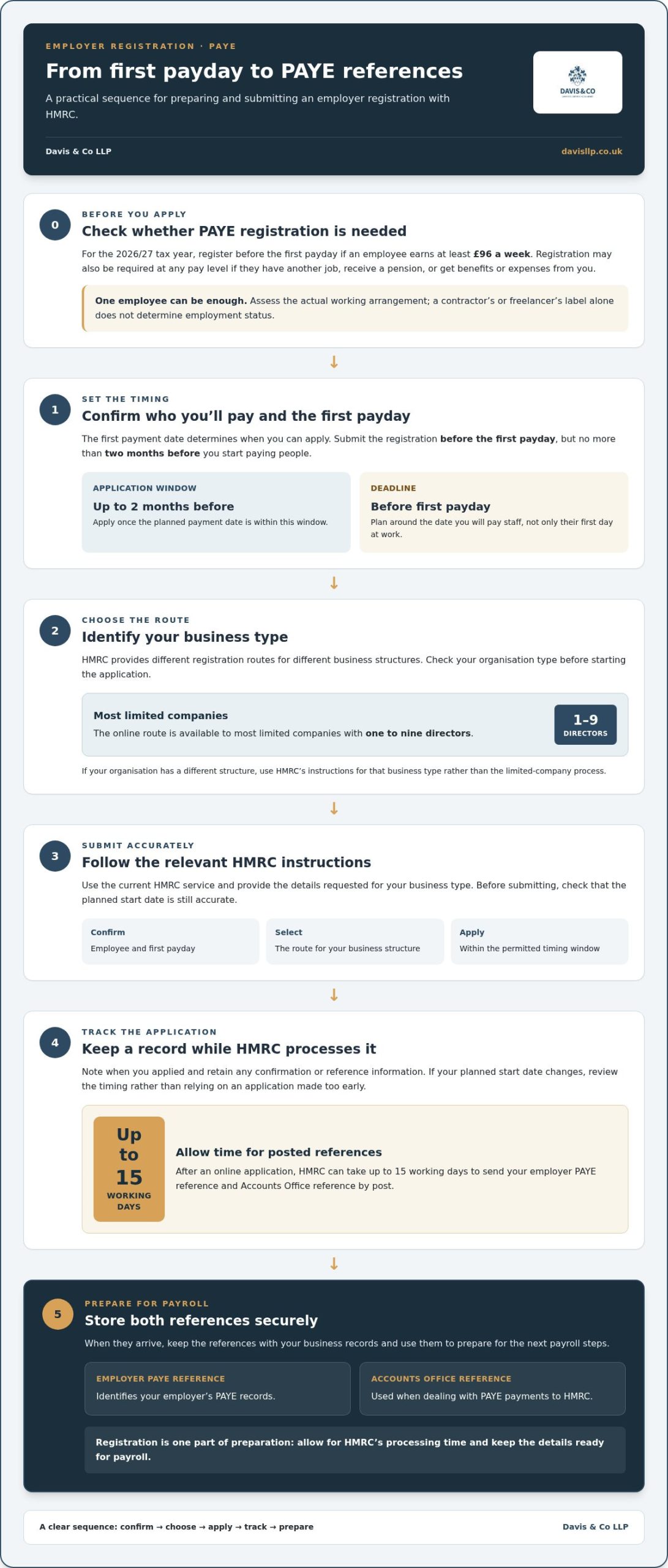
Use this sequence to organise your application:
- Confirm the employee and first payday. Establish who you’ll pay and when the first payment is due. The date you start paying staff determines when you can apply.
- Identify your business type. Check whether you’re registering a limited company or another type of business. HMRC provides different routes, so the online application for limited companies may not apply to your organisation.
- Follow the relevant HMRC instructions. Most limited companies with one to nine directors can apply online. Use the instructions for your business type and provide the details requested through HMRC’s current service.
- Keep a record of the application. Note when you applied and retain any confirmation or reference information. This helps you track progress and prepare for the next payroll steps.
Choose the right HMRC registration route for your business
The online route is intended for most limited companies with one to nine directors. If your organisation has a different structure, follow HMRC’s guidance for that business type rather than trying to use the limited-company process. The official Register as an employer and set up PAYE service explains the current routes and application instructions. Use the route that fits your business when you apply.
When should you submit the employer registration?
Submit your application before the first payday, but no more than two months before you start paying people. Apply once the payment date is within that window, leaving time for HMRC to process your registration. If the start date changes, review your application timing rather than relying on an application made too early.
After an online application, HMRC can take up to 15 working days to send your employer PAYE reference and Accounts Office reference by post. Include that possible wait in your payroll preparations, especially if the first payday is approaching. The PAYE reference identifies your employer record, while the Accounts Office reference is used when dealing with PAYE payments to HMRC. Keep both details securely with your business records when they arrive.
For a practical approach to how to register as an employer with HMRC, work back from the planned payday: confirm the date, identify the correct route, apply within the two-month window, then keep track of HMRC’s references. Registration is an administrative step, but paying staff also requires careful record-keeping and financial planning. Davis & Co’s Tax & Business Advisory and Compliance & Record-Keeping services can help businesses plan for those responsibilities.
What happens after registration: setting up PAYE and payroll
Registering with HMRC creates the employer record. It does not set up your payroll or complete your ongoing PAYE responsibilities. Once HMRC sends your PAYE and Accounts Office references, enrol for the PAYE Online service. HMRC then posts an activation code, which you must use within 28 days. Keep an eye on the post and follow HMRC’s instructions so you can access and manage your PAYE account.
You’ll also need suitable payroll software to calculate pay and deductions and report payroll information to HMRC. Review current HMRC guidance on software requirements before choosing how to run payroll. HMRC’s Basic PAYE Tools may be an option for very small employers. Registration is the starting point; the regular payroll cycle involves connected tasks that need to be completed accurately and on time.
Choose how payroll will be managed
You can manage payroll in-house or appoint an accountant or payroll provider. If you handle it internally, you’re responsible for calculations, employee and payment records, and submissions to HMRC. If you appoint a provider, agree which tasks they will handle and which remain with your business. In either case, decide who will maintain the records and respond when payroll details change.
Prepare the first payroll and ongoing records
Before processing a payment, gather the employee information your payroll arrangements require. Set up a consistent way to record pay, deductions and payment dates, then follow the operational sequence:
- Calculate pay and deductions. Use the employee’s details and current payroll rules to work out the amounts for the pay period.
- Report pay to HMRC. Send a Full Payment Submission (FPS) on or before payday, as required under Real Time Information (RTI).
- Pay the employee and retain the records. Keep payroll information organised so calculations and submissions can be reviewed and reconciled.
- Pay amounts due to HMRC. PAYE and National Insurance are generally due by the 22nd of the month after the pay period when paying electronically, or by the 19th when paying by post. Check HMRC’s current payment guidance for the applicable arrangements.
Annual payroll tasks are also part of the cycle. Track HMRC’s current year-end instructions and deadlines alongside regular reporting, rather than leaving them until the end of the year. Good records make it easier to explain how figures were calculated and deal with queries or corrections.
If your first payday arrives before HMRC has sent your PAYE reference, run payroll as normal, save the FPS and submit it as a late submission once the reference arrives. This is one reason to plan the application and payroll setup together. Knowing how to register as an employer with HMRC is useful, but a reliable process for calculating, reporting and paying payroll amounts is what carries that registration into day-to-day compliance.
Before the first payday: a practical checklist for new employers
HMRC registration is one part of preparing to employ someone, not a sign that every employer responsibility is complete. Before the first payday, coordinate the PAYE arrangements with the wider steps involved in bringing a staff member into the business. A clear checklist shows what’s ready and what still needs an owner.
PAYE and payroll readiness:
- Confirm the employee’s start date and first payday.
- Check that you’ve submitted the employer registration application within HMRC’s permitted window, and track the references and PAYE Online access.
- Decide who will manage payroll, which software or process you’ll use, and how employee details, pay calculations and deductions will be recorded.
- Identify who will review payroll information and ensure required submissions and payments are handled on time.
These actions address payroll administration. They don’t replace the separate checks and arrangements that may apply to your workplace or employee. For example, employers should consider workplace pension duties, employer liability insurance, right-to-work checks and workplace safety. Which requirements apply and what steps they involve depend on the circumstances. Use current official guidance for each area rather than assuming PAYE registration covers it.
Which employer responsibilities sit outside PAYE registration?
Treat these as parallel workstreams, not additions to the PAYE application. Establish whether pension duties apply, address insurance requirements, carry out appropriate employment checks and consider the health and safety arrangements relevant to the work. Record who is responsible and where evidence will be kept. For a related compliance topic, Davis & Co’s National Minimum Wage and employer compliance guide provides further context.
How can a new employer organise the work?
Assign an owner to each task, even if one person handles several. Work back from the confirmed start date and payday, with separate entries for registration, payroll preparation, employee checks and workplace arrangements. Add a status and a place to store relevant records. This makes outstanding actions visible and helps prevent one completed step from being mistaken for overall readiness.
Keep the wider business implications in view. Hiring affects cash-flow planning and the records you need to maintain, as well as the immediate payroll workload. A broader small business accounting and growth guide can help frame those considerations within your compliance planning.
Understanding how to register as an employer with HMRC is a useful starting point. A coordinated plan carries that work through to the first payday and beyond. For tailored advice on the accounting and compliance considerations involved in employing staff, discuss your employer compliance planning with Davis & Co.
How Davis & Co can support sound employer compliance planning
Employers apply to register for PAYE through HMRC’s official service and receive their references from HMRC. An accountant’s role is different: advice can help you understand how employing staff fits with your business’s tax, record-keeping and financial planning. For anyone asking how to register as an employer with HMRC, keeping those roles distinct sets clear expectations. Advice can support informed decisions, while the HMRC application remains a separate step.
Davis & Co’s Tax & Business Advisory and Compliance & Record-Keeping services support the planning and records around employer responsibilities. They help businesses consider how to organise their obligations and financial information as they take on staff.
Where accounting advice fits into employer planning
Employing staff can affect cash flow, budgets and the records you need to understand business performance. Accurate, well-organised information gives decision-makers a clearer basis for reviewing payroll-related commitments alongside other business outgoings. Compliance planning can also help establish who is responsible for maintaining records and reviewing relevant information. The right approach depends on your business and circumstances.
Wider financial planning can complement that work. Davis & Co’s Business Growth Package and Managing Cash Flow & Profits support broader business planning, including consideration of how employment-related commitments fit within the organisation’s financial position. These services relate to the context in which a business plans to employ people and meet its responsibilities.
- Tax & Business Advisory: helps frame employer responsibilities within the business’s wider tax and operational considerations.
- Compliance & Record-Keeping: supports organised information for business oversight.
- Business Growth Package: connects employment decisions with wider business planning.
- Managing Cash Flow & Profits: supports consideration of financial commitments as the business develops.
Take the next step with considered business advice
Good advice should reflect your organisation’s structure, plans and existing record-keeping processes, rather than assume every employer has the same needs. Davis & Co LLP is an independent firm of Chartered Certified Accountants, established in 1901. For broader context on how accounting advice can relate to business growth and compliance, explore this UK small business accountant guide.
If you’re reviewing the implications of employing staff, explore tailored tax and business advisory support to consider how compliance planning and financial oversight fit your business. Complete the registration itself through HMRC’s official service.
Plan your next steps with confidence
Taking on staff is a business decision as well as an administrative one. As your plans develop, consider how employment commitments fit your wider financial priorities, who will oversee the related records, and where informed advice may help. A considered approach gives you a clearer view of the implications for your business.
If you’re still working through how to register as an employer with HMRC, use HMRC’s official service for the application. Accounting advice has a different role: it can help you think through the tax, record-keeping and financial planning considerations around becoming an employer, without replacing HMRC’s process.
Davis & Co provides tailored UK and international tax services for individuals and businesses, alongside Compliance & Record-Keeping and Managing Cash Flow & Profits. To explore how this advice may relate to your business plans, explore Davis & Co’s tax and business advisory services.
With clear responsibilities and a plan suited to your organisation, you can take the next step towards employing staff with greater assurance.
Frequently Asked Questions
Can I register as an employer before I have chosen a payroll system?
Yes. HMRC registration and setting up payroll are separate tasks, so you can apply before choosing a payroll system. Follow HMRC’s current registration guidance for your business, then arrange how payroll will be managed before paying staff. Decide who will calculate pay and deductions, maintain the necessary records and submit payroll information. Make sure your process meets current HMRC requirements.
How long does it take HMRC to send an employer PAYE reference?
After an online application, HMRC can take up to 15 working days to send your employer PAYE reference and Accounts Office reference by post. Allow for this when planning your first payroll, particularly if the payday is approaching. Apply within the permitted window and keep track of the references so you can complete the next steps when they arrive.
What should I do if my employer PAYE reference has not arrived by payday?
Run payroll, save the Full Payment Submission (FPS), then send it to HMRC as a late submission once your reference arrives. Follow HMRC’s current instructions for your specific circumstances and keep a record of the payroll run and the steps taken. Don’t treat a missing reference as a reason to delay a payment due to your employee.
Do I need an employer PAYE reference as well as a PAYE Online login?
Yes, they serve different purposes. The employer PAYE reference identifies your business’s PAYE registration, while PAYE Online gives you access to manage PAYE matters digitally. Receiving a reference doesn’t necessarily mean your online access is ready. Follow HMRC’s current account setup instructions to enrol and link the service for your business.
Can I register as an employer if my first employee has not started yet?
You can apply before the employee starts, provided you have a confirmed start date and are within HMRC’s application window. You can’t register more than two months before you start paying people. A possible hire without an agreed start date is not a reason to apply early. Review the timing if the expected start date or first payment date changes.
Does registering as an employer automatically set up a workplace pension?
No. HMRC registration and workplace pension duties are separate parts of becoming an employer, so completing one doesn’t establish whether you’ve met the other. Assess your pension responsibilities independently in light of your workforce and circumstances. Use current official guidance from The Pensions Regulator and GOV.UK to understand which duties apply, how to assess staff eligibility and what actions may be required. PAYE registration does not complete pension arrangements.